

News & Insights
News
Insights
Recent Posts
- Strengthen Trust in Your Nonprofit With a Conflict-of-Interest Policy
- Maner Costerisan Strengthens Grand Rapids Presence with New Office
- Assessing Your Business’s Fraud Risks
- Employee Benefit Plan Audit FAQs: What Plan Sponsors Need to Know
- What Higher 2026 AMT Risk may Mean for Your Year-End Tax Planning
- Prepare a Successor to Lead Your Family Business
- Good Intentions Aren’t a Defense: D&O Insurance for Nonprofits
- What are the Tax Implications of Cryptocurrency Transactions?

Microsoft Dynamics GP Release 18.4 Now Available


As promised, when Microsoft introduced their new Modern Lifecycle roadmap for Dynamics GP, Microsoft is releasing two updates per year. The latest update, Release 18.4, was released in October and is ready for you to install if you haven’t already. The focus of this release was on adding new features that users requested. In this article, we will highlight one of our favorite new features – Default Inquiry Sort Options (AP, AR, BR):
The Default Inquiry Sort options for Payables, Receivables, and Bank Reconciliation will save you time by not always clicking filter/sort options in the inquiry windows. If you set the sort option to descending, the window will always display the most recent documents when it is opened.
When users go into the Inquiry windows with these sorting options, the first thing they most often do is change the sort type to be Document Number or Document Date and select descending, as they want to display the most recent documents. Now, these sort option settings can be saved as default, saving you a lot of time when trying to locate transactions.
In addition to the sort options being saved, the inquiry windows Include Type (Work/Open/History), and window size can also be saved for default. To set the default inquiry window preferences, the user must select the desired sort options, including type and desired window size. Once these have been selected, the user will click the View button on the inquiry window and select the Save Windows Preferences option.
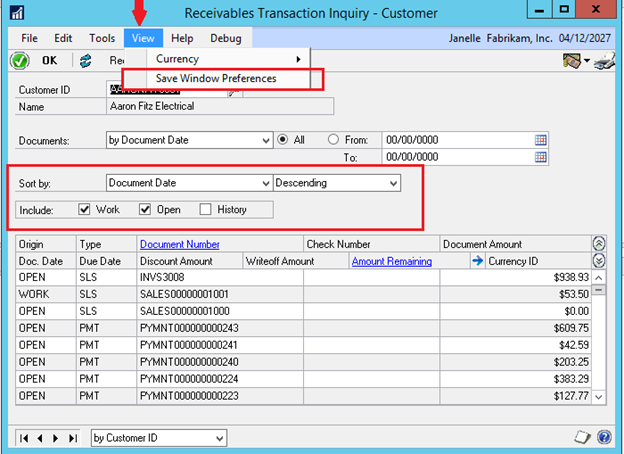
These saved default settings are per individual user, and the individual inquiry windows are system-wide, so the saved setting will default for any company that the user logs into. If the user wants a different default view, they simply set their desired window preferences (sort option, include type and window size), click the View button and select the Save
Windows Preferences option again to save the new desired preference. The next time the user opens that window, their new default setting will display.
Sort options have also been added to the Checkbook Register Inquiry and Checkbook Balance Inquiry window.
Contact the Microsoft Dynamics GP experts at Maner Costerisan if you have questions on the latest release.
The materials provided in the News & Insights section are for general informational purposes only and may not reflect the most current legal, tax, or financial developments. While we strive to ensure accuracy at the time of publication, Maner Costerisan does not guarantee that the information remains up-to-date or free from error. We recommend consulting directly with a Maner Costerisan team member to confirm the applicability and relevance of any information to your specific situation.